Best CRM software for customer service teams in 2026

Best overall for ticket-based support: Zendesk. Best for relationship-led follow-up: Arches CRM. Best for complex enterprise cases: Salesforce Service Cloud. The best CRM for customer service in 2026 depends on whether your team manages support tickets, customer relationships, or both.
- Zendesk is the best CRM for customer service teams whose work centers on support tickets and queues.
- Arches CRM fits growing sales teams that need customer conversations, pipeline context, and automated follow-ups together.
- Salesforce Service Cloud fits complex case management; HubSpot Service Hub fits connected sales and service teams.
- Freshdesk fits focused help-desk workflows; Zoho Desk fits support teams already using the Zoho ecosystem.
Why this matters
A customer asks a question. Someone replies, someone promises a follow-up, and nobody owns the next action. The problem is not just a missing message: your team has lost the connection between the conversation and the work it creates.
Customer service software addresses different parts of that problem. A ticketing platform organizes requests and escalations. A relationship-focused CRM connects conversations to contacts, opportunities, and follow-up tasks. Buying one when you need the other creates extra handoffs.
For your 2026 shortlist, start with the work your team must complete—not the longest feature list. A support department resolving technical incidents needs a different system from an account team handling onboarding questions and renewal conversations.
What makes the best CRM for customer service?
Use these criteria before comparing products. Each criterion should become something you ask the vendor to demonstrate with your own customer scenarios.
- Customer context: Can the person replying understand the contact, previous conversations, and relevant sales history without reconstructing the relationship?
- Request ownership: Can your team assign responsibility, track unresolved work, and hand a request to someone else without losing accountability?
- Channel fit: Does the system support the communication channels your customers actually use? Check the exact channel, integration, and workflow—not a generic multichannel claim.
- Follow-up automation: Can the system create the next task or reminder from a meaningful event? Automation should preserve ownership, not just send messages.
- Service depth: Does your team need ticket queues, case routing, service-level tracking, or a knowledge base? Those requirements favor dedicated service platforms.
- Administration: Who will maintain fields, routing rules, permissions, and integrations? Match the system to the people responsible for keeping it useful.
A product wins its use-case slot by matching the underlying work. It does not win because it includes every possible feature.
Best customer service CRM options at a glance
The table separates relationship management from support operations. Its order matches the detailed recommendations below; each product serves a distinct buyer.
| Option | Best for | Standout capability | Key limitation or trade-off |
|---|---|---|---|
| Arches CRM | Relationship-led customer follow-up | Contacts, conversations, tasks, and sales pipelines together | A sales-centered workflow is not the same as a dedicated support-ticket operation |
| Zendesk | Ticket-based support departments | Ticketing, support queues, and knowledge-base workflows | Sales opportunity management requires a separate assessment |
| Salesforce Service Cloud | Complex enterprise case management | Configurable cases, routing, and customer records | Configuration and administration demand clear ownership |
| HubSpot Service Hub | Connected sales and service teams | Service tools within the HubSpot CRM ecosystem | Fit depends on how your team uses the wider platform |
| Freshdesk | Focused help-desk operations | Ticket handling and customer support workflows | A help desk does not replace a sales pipeline CRM |
| Zoho Desk | Support teams using Zoho applications | Ticket management within the Zoho ecosystem | Cross-application handoffs still need configuration |
For a 2026 purchase, ask vendors to demonstrate the exact edition and configuration you intend to use. A capability shown in a presentation is not proof that your proposed setup includes it.
1. Arches CRM: best for relationship-led customer follow-up
Arches CRM brings contacts, customer conversations, tasks, and sales activity together. Its stated communication features include email, WhatsApp, SMS, and calls, while workflow automation supports reminders, tasks, and follow-up sequences.
This is a useful fit when customer service sits close to sales: answering questions during a deal, tracking promised follow-ups, and keeping relationship history accessible. The central object is the customer relationship, not just the request waiting in a queue.
Arches CRM is best for growing sales teams that handle customer service through ongoing conversations and follow-up workflows.
Pros:
- Connects lead and contact management with sales pipelines.
- Brings several customer communication channels into the same platform.
- Supports automated reminders, tasks, and follow-up sequences.
- Connects existing business tools through integrations and APIs.
Cons:
- Sales pipeline stages are not substitutes for support case statuses.
- Relationship-led workflows need clear rules separating service follow-up from sales outreach.
- Teams centered on incident queues should prioritize dedicated ticketing requirements.
Best for: Growing sales teams responsible for customer conversations before and after a deal.
Verdict: Buy for relationship-led follow-up; skip this category fit when dedicated support-ticket operations drive the decision.
2. Zendesk: best for ticket-based customer support
Zendesk organizes customer support around tickets, agent workflows, and help-center content. It fits teams that need to receive requests, assign them, track their status, and resolve them through a defined support process.
The distinction is operational. A request remains visible as work to resolve, rather than relying on someone remembering to revisit a contact record. Evaluate how ticket ownership changes during escalation and how agents find relevant customer context.
Zendesk pros:
- Ticket-based structure gives support requests a defined lifecycle.
- Support queues help organize incoming work.
- Knowledge-base workflows support customer self-service.
- Agent workflows suit teams whose main responsibility is resolving requests.
Zendesk cons:
- Ticket resolution does not replace opportunity and pipeline management.
- Connecting support history to a separate sales CRM adds integration work.
- Routing and help-center content need ongoing maintenance.
Best for: Dedicated support departments managing a queue of customer requests.
Verdict: Buy when tickets, queues, and resolution workflows are your core requirements.
3. Salesforce Service Cloud: best for complex enterprise cases
Salesforce Service Cloud supports customer service through cases, routing, and configurable customer records within Salesforce. It fits organizations that need service processes to reflect different teams, account structures, and escalation paths.
The value is configuration depth. The trade-off is responsibility: someone must define the process, maintain it, and prevent unnecessary complexity from spreading into the agent workflow.
Salesforce Service Cloud pros:
- Case management provides a structured foundation for service work.
- Configurable records support organization-specific customer information.
- Routing supports defined assignment and escalation processes.
- Service can connect with other Salesforce customer workflows.
Salesforce Service Cloud cons:
- Detailed configuration creates an ongoing administration workload.
- Unnecessary fields and process branches make agent work harder.
- A poorly defined service process remains poorly defined after configuration.
Best for: Enterprises with complex case handling and an accountable platform administration team.
For a 2026 evaluation, ask the administrator and frontline agent to review the same case. Both must understand what happens next.
Verdict: Buy for complex case management; hold if nobody owns administration.
4. HubSpot Service Hub: best for connected sales and service teams
HubSpot Service Hub adds customer service tools to the HubSpot CRM ecosystem, including ticketing and knowledge-base capabilities. Its clearest use case is a team that wants sales and service work connected through shared customer records.
Evaluate the handoff, not just the record. A service agent needs relevant sales context, while a salesperson needs to know whether an unresolved customer issue changes the next conversation.
HubSpot Service Hub pros:
- Service work sits within the wider HubSpot customer platform.
- Ticketing gives requests a trackable status.
- Knowledge-base capabilities support repeatable answers.
- Shared CRM context supports sales-to-service handoffs.
HubSpot Service Hub cons:
- Adoption decisions extend beyond the service team when other teams use HubSpot.
- Shared records still require clear ownership and permissions.
- Feature access needs checking against the proposed edition.
Best for: Businesses coordinating sales and service within HubSpot.
Verdict: Buy when shared sales-and-service context is the main requirement.
5. Freshdesk: best for focused help-desk operations
Freshdesk is a customer support platform built around tickets and help-desk workflows. It belongs on your shortlist when the immediate job is organizing incoming requests rather than redesigning the entire customer relationship system.
Keep the evaluation focused. Test assignment, ticket status, escalation, and the agent's ability to understand a request before replying. Treat sales pipeline management as a separate requirement.
Freshdesk pros:
- Ticketing gives incoming requests a defined place to live.
- Support workflows focus the team on unresolved work.
- Knowledge-base tools support reusable customer guidance.
Freshdesk cons:
- Help-desk records do not replace sales opportunities.
- Customer history held elsewhere requires a deliberate integration plan.
- Ticket workflows still need owners and maintained rules.
Best for: Support teams whose immediate priority is a focused help desk.
Verdict: Buy for help-desk work; skip it as a standalone replacement for sales CRM.
6. Zoho Desk: best for teams using the Zoho ecosystem
Zoho Desk provides customer support ticketing and service workflows within the wider Zoho product ecosystem. It is a relevant candidate when your business already uses Zoho applications and wants support work connected to that environment.
Existing software is a reason to evaluate fit, not a reason to ignore the workflow. Demonstrate how a customer record, support request, and sales handoff connect in your intended configuration.
Zoho Desk pros:
- Ticket management gives support requests a defined lifecycle.
- Knowledge-base capabilities support self-service content.
- Its ecosystem fit matters for businesses already using Zoho applications.
Zoho Desk cons:
- Separate applications still need explicit handoff rules.
- Shared customer data needs field mapping and ownership.
- An existing ecosystem does not remove the need for agent testing.
Best for: Support teams operating within a Zoho-based business setup.
Verdict: Buy when the Zoho connection improves your actual service workflow.
How the recommendations were ranked
These recommendations prioritize workflow fit, customer context, request ownership, automation, and administration. They are not a speed benchmark or a claim that every feature is available in every edition.
The relationship-led option comes first because customer service can include ongoing account conversations rather than a formal support queue. Zendesk remains the default recommendation for dedicated ticket-based support. Enterprise configuration, shared-platform context, focused help-desk work, and existing ecosystem fit determine the remaining use-case slots.
Test the workflow before choosing
Use a small, explicit evaluation instead of an unstructured demo. For your 2026 shortlist, prepare 10 customer scenarios, 3 workflows, and 2 responsible owners. These are suggested test inputs, not performance benchmarks.
Choose scenarios that expose real handoffs: a new inquiry, an unanswered message, a repeated question, an escalation, and a customer contacting another department. Include both straightforward and awkward cases.
Then follow this sequence:
- Capture request: Show where the conversation enters the system.
- Assign owner: Identify who is responsible for the response.
- Record context: Show what the next person needs to understand.
- Trigger follow-up: Demonstrate the task or reminder created by the event.
- Confirm resolution: Show how completed work stops generating unnecessary follow-ups.
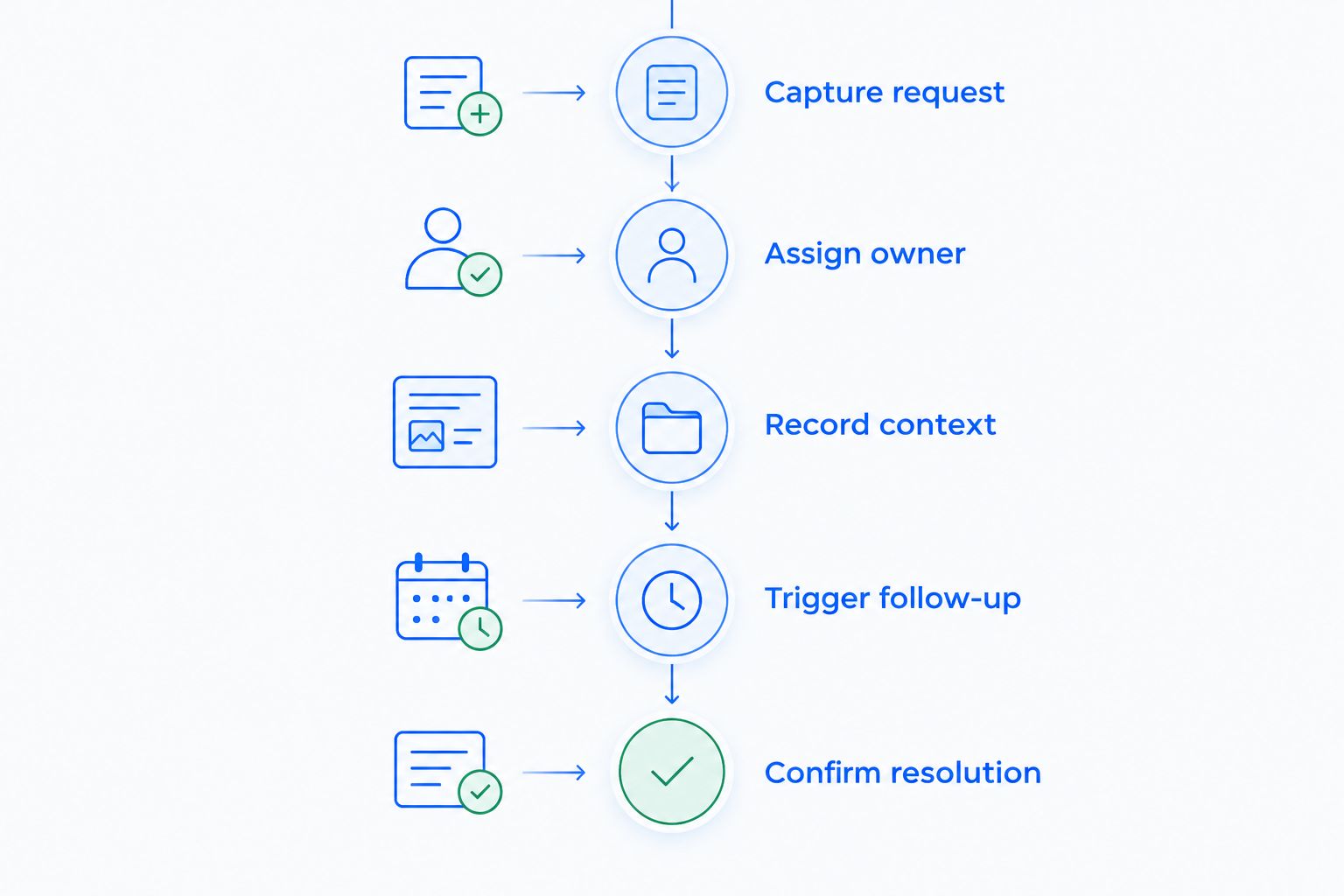
Use the 3 workflows to represent routine support, escalation, and relationship follow-up. Give the 2 owners different responsibilities: one frontline user and one person responsible for maintaining the system.
Reject a demonstration that stops after sending a message. Your test ends when the request is resolved, the record is accurate, and no obsolete reminder remains active.
Which customer service CRM should you choose?
Choose Zendesk by default for a dedicated support department managing tickets and queues. Choose the relationship-led option when your team mainly needs customer conversations connected to sales context and follow-up tasks.
Salesforce Service Cloud fits complex case processes with administrative ownership. HubSpot Service Hub fits a shared HubSpot sales-and-service setup. Freshdesk fits focused help-desk work. Zoho Desk deserves priority when your existing Zoho environment makes the handoff simpler.
For a 2026 decision, write down the workflow you refuse to lose. That requirement should determine the shortlist before optional features enter the discussion.
FAQ
What's the best CRM for customer service in 2026?
Zendesk is the default recommendation for dedicated ticket-based support teams. Choose by workflow: relationship follow-up, enterprise cases, and shared sales-and-service records each call for a different shortlist.
Is Arches CRM a good choice for customer service?
Arches CRM fits growing sales teams that handle customer service through customer conversations and automated follow-ups. Its stated features connect contacts, communication channels, tasks, and sales pipelines; dedicated ticket-based operations require a separate service-depth evaluation.
What's the difference between a CRM and a help desk?
A CRM organizes customer relationships, while a help desk organizes requests that need resolution. Some platforms combine these functions, but you still need to define contact ownership separately from ticket ownership.
Is Zendesk better than Salesforce Service Cloud?
Zendesk fits ticket-centered support, while Salesforce Service Cloud fits configurable enterprise case processes. Choose according to your routing complexity, customer data requirements, and capacity to administer the platform.
Which option fits a business already using HubSpot?
HubSpot Service Hub is a relevant first candidate for businesses already using HubSpot CRM. Test whether shared records give service agents useful context and whether sales teams can see unresolved service issues.
Can customer service software automate follow-ups?
Customer service software can automate follow-ups when the chosen product and configuration support the required triggers and actions. Test what starts the workflow, who owns the next action, and what stops reminders after resolution.
What should I ask during a customer service CRM demo?
Ask the vendor to complete a customer request from capture through resolution using your proposed configuration. Include reassignment, an unanswered message, and an escalation so you can inspect ownership and follow-up behavior.
One last thing
The most revealing demo question is not whether the system sends a reminder. Ask what happens when a customer replies after a colleague has already resolved the issue.
Test the stopping rule as carefully as the sending rule. A useful workflow updates the record and avoids reopening completed work without a reason. That is the difference between automating activity and keeping customer service under control.