Pipedrive alternatives in 2026

Pipedrive gives sales teams a clear, visual way to track deals and their next activities. That visibility stops being enough when your real problem is keeping customer conversations, follow-ups, and pipeline updates connected without repeated manual work. The best Pipedrive alternative in 2026 is Arches CRM if you need conversation-driven sales automation; HubSpot if you need sales connected to a broader marketing and service platform.
- Among Pipedrive alternatives, Arches CRM is best for connecting customer conversations, automated follow-up, and pipeline movement.
- Choose HubSpot for connected marketing and sales, Zoho CRM for configurable workflows, or Salesforce for complex sales operations.
- Keep Pipedrive when your pipeline works and the actual problem is inconsistent ownership or unfinished configuration.
- Test customer replies, silent leads, and handoffs before committing to a CRM migration.
Why this matters
A lead arrives, someone replies, and the conversation moves from email to WhatsApp. If the next task never gets assigned, a visible deal still goes nowhere. Your CRM needs to support the next action, not just display the opportunity.
For a 2026 shortlist, separate two problems: an unsuitable platform and an unfinished sales process. Replacing software will not fix unclear stage definitions, missing ownership, or follow-up rules nobody has agreed on. Define the broken handoff before comparing features.
Pipedrive alternatives at a glance
Use this 2026 comparison to choose which platforms deserve a workflow demonstration. The differences describe buying priorities, not features that Pipedrive necessarily lacks.
| Platform | Best for | Standout capability | Main distinction from Pipedrive |
|---|---|---|---|
| Arches CRM | Conversation-driven follow-up | Pipeline movement based on customer interactions and configured workflows | Centers the evaluation on conversations triggering sales actions |
| Pipedrive | Focused sales pipeline management | Visual deals and activity tracking | The benchmark for a sales-focused workflow |
| HubSpot | Connected marketing, sales, and service | Connected customer records across business functions | Broader customer-platform scope |
| Zoho CRM | Configurable sales processes | Workflow automation and process configuration | A candidate when your sales rules need detailed configuration |
| Salesforce | Complex sales operations | Customizable customer records, workflows, and reporting | A candidate for deeper organizational customization |
Do not choose from the table alone. Ask each vendor to demonstrate the same customer journey, including what happens when a prospect replies, changes channel, or stops responding.
1. Arches CRM: best for conversation-driven follow-up
Arches CRM brings lead records, conversations, tasks, and sales activity together. Its sales CRM and workflow automation capabilities include follow-up sequences, email summaries, and opportunity movement based on customer interactions and configured rules.
Best for: Growing sales teams that need customer communication to drive the next task or pipeline action.
Where it shines
- Connects email, WhatsApp, SMS, and calls with sales activity.
- Supports reminders, tasks, and follow-up sequences instead of relying entirely on memory.
- Summarizes email conversations so a rep can recover context before responding.
- Moves opportunities through the pipeline using customer interactions and configured workflows.
Where it falls short
- Automated stage movement still requires clear rules. A reply is not automatically evidence that a deal has reached the next stage.
- This is a sales CRM recommendation, not proof that every marketing or customer-service requirement belongs in the same system.
- Integrations and APIs do not establish compatibility with every tool you already use. Test your actual connections.
| Buying question | Alternative's focus | Pipedrive benchmark |
|---|---|---|
| How do deals progress? | Customer interactions and configured workflows | Visual pipeline and activity management |
| How does a rep recover context? | Conversation records and email summaries | Demonstrate the existing deal and communication workflow |
| What drives follow-up? | Automated reminders, tasks, and sequences | Compare the team's configured activities and automation |
For the demonstration, use a prospect who asks a question rather than accepting the proposal. Check whether the system preserves the conversation, gives the right person a task, and avoids advancing the opportunity incorrectly.
Verdict: Buy if Arches CRM demonstrates your conversation-to-follow-up workflow with the controls your team needs.
2. HubSpot: best for connected marketing and sales
HubSpot combines CRM capabilities with products for marketing, sales, and customer service. It belongs on your shortlist when the buying decision extends beyond the sales pipeline into how teams share customer information.
Best for: Businesses that want marketing activity, sales execution, and customer-service context connected across functions.
Where HubSpot shines
- Supports a broader customer-platform approach than a pipeline-only evaluation.
- Connects sales work with marketing and service processes.
- Gives cross-functional teams a shared customer-record foundation.
Where HubSpot falls short
- A broader platform introduces more scope to define. Decide which teams and processes actually belong in the project.
- Moving departments together creates more implementation work than replacing a sales board alone.
- Product packaging matters: verify each required workflow rather than assuming every capability belongs in your selected configuration.
| Dimension | HubSpot | Pipedrive |
|---|---|---|
| Primary evaluation | Cross-functional customer processes | Focused sales execution |
| Organizational fit | Marketing, sales, and service stakeholders | Sales-led buying team |
| Demonstration priority | Customer context across departments | Deal ownership and next activities |
Choose HubSpot because your operating model needs connected functions, not because a longer product list looks impressive. If marketing and service are staying elsewhere, establish what the sales team gains from the additional scope.
Verdict: Buy if connected marketing, sales, and service is a defined requirement; otherwise hold.
3. Zoho CRM: best for configurable sales workflows
Zoho CRM supports sales automation, configurable records, and process management. It is a useful Pipedrive alternative to evaluate when your buying criteria revolve around how closely the system follows your sales rules.
Best for: Teams with defined routing, qualification, and handoff requirements that need configuration.
Where Zoho CRM shines
- Supports workflow automation and configurable sales processes.
- Provides customization for how customer and opportunity information is organized.
- Fits an evaluation focused on rules, exceptions, and process consistency.
Where Zoho CRM falls short
- Configuration needs ownership. Someone must maintain the rules as your process changes.
- Recreating every existing exception can preserve a broken process instead of fixing it.
- More fields and workflow branches are not useful if reps cannot identify the next action.
| Dimension | Zoho CRM | Pipedrive |
|---|---|---|
| Evaluation emphasis | Configured sales rules | Pipeline clarity and activity execution |
| Demonstration priority | Routing and process exceptions | Deal progression and next actions |
| Adoption test | Can reps follow the configured process? | Can reps keep deals and activities current? |
Bring an exception to the demonstration: a lead assigned to the wrong territory, an opportunity returning to qualification, or a customer with multiple contacts. That reveals more than a clean sample pipeline.
Verdict: Buy if configuration solves a documented process gap; hold if your rules are still unsettled.
4. Salesforce: best for complex sales operations
Salesforce supports customizable customer records, automation, and reporting. Include it when your requirements involve organizational complexity, not simply a desire for more features.
Best for: Organizations with specialized sales processes and clear responsibility for CRM administration.
Where Salesforce shines
- Supports substantial customization of records and workflows.
- Provides reporting for managing sales operations.
- Fits projects where the CRM must reflect detailed business requirements.
Where Salesforce falls short
- Customization creates decisions your team must own, document, and maintain.
- An undefined implementation can expand beyond the original sales problem.
- A team seeking straightforward deal tracking should first establish why deeper configuration is necessary.
| Dimension | Salesforce | Pipedrive |
|---|---|---|
| Buying priority | Organizational customization | Sales pipeline execution |
| Project focus | Data structure, rules, and reporting | Deals, activities, and rep workflow |
| Decision test | Do specialized requirements justify the scope? | Does the existing sales process fit? |
Verdict: Buy if operational complexity justifies the implementation scope; skip if you only need cleaner follow-up.
Why people switch from Pipedrive
The useful reasons to switch are workflow requirements, not complaints about a recognizable competitor. These are the decision points to examine before replacing Pipedrive in 2026.
Conversations need to produce actions
A stored message is not the same as an assigned follow-up. If your requirement is to turn customer interactions into tasks or controlled pipeline movement, ask each vendor to demonstrate that sequence using your rules.
Start with how workflow automation reduces manual CRM data entry. Identify the update you want removed before deciding which platform should remove it.
The project extends beyond sales
Choose a broader evaluation when marketing and customer service need to work from connected customer information. HubSpot belongs in that discussion. Keep the project sales-focused if those departments have no requirement to move.
Your process needs more configuration
Zoho CRM and Salesforce deserve consideration when routing, record structures, or reporting requirements drive the decision. First write down the requirement. Then establish whether your current Pipedrive configuration already supports it.
Switch for a demonstrated workflow improvement, not a different-looking pipeline. A vendor demonstration should expose the work that disappears and the work your team still owns.
Run the same workflow test before you choose
A useful 2026 evaluation follows the lead from arrival to handoff. Ask vendors to use the same scenarios so you can compare outcomes rather than presentation quality.
Use these stages as your demonstration checklist:
- Lead capture: Create the customer record and establish responsibility.
- Customer reply: Preserve context when the prospect responds or changes channel.
- Next action: Show the assigned task or controlled pipeline update.
- Sales handoff: Give the next owner enough context to continue the conversation.
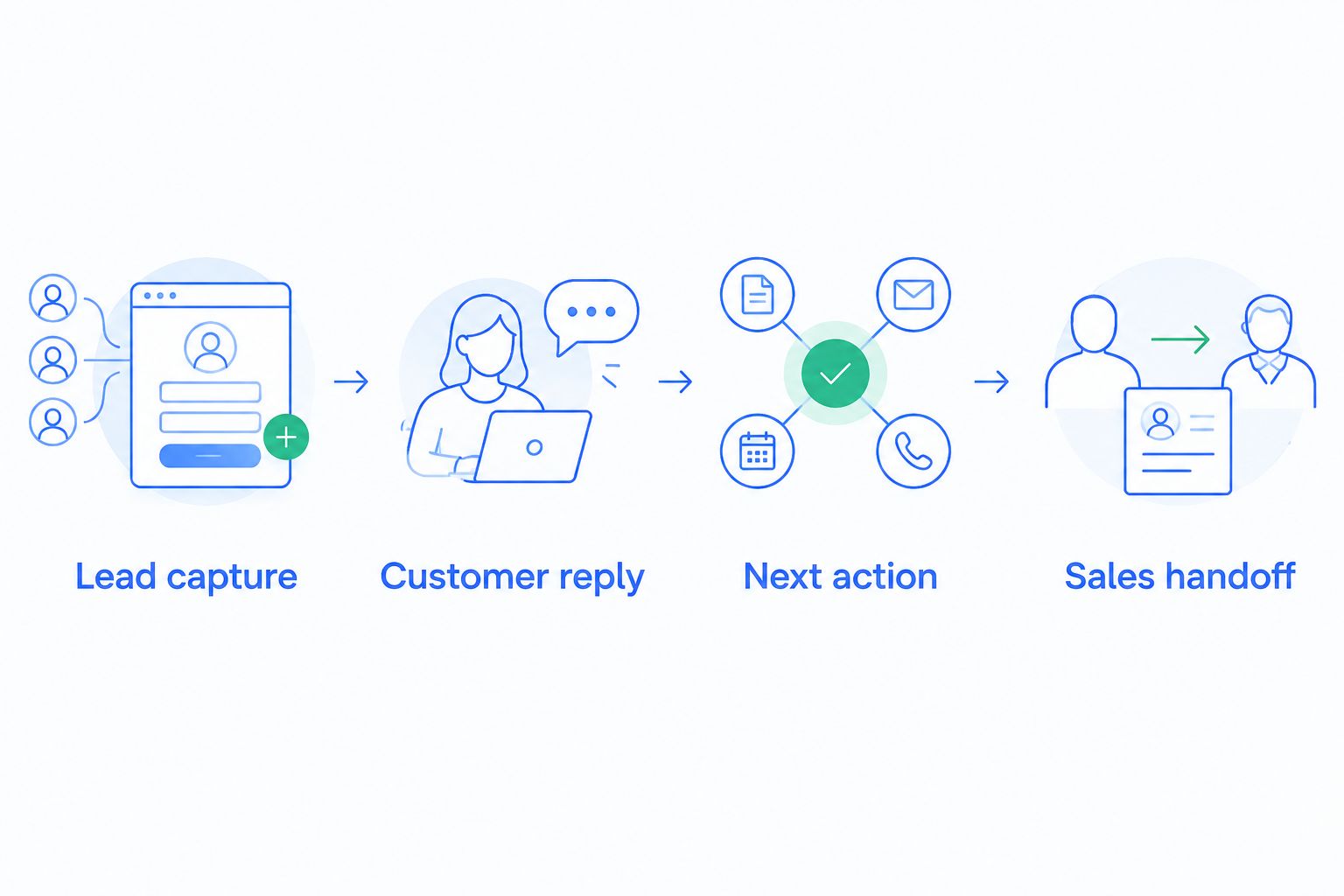
For a controlled pilot, select 5 active deals representing different stages. Assign 1 accountable owner to approve workflow changes. Run 3 workflow tests: a positive reply, a question that needs a response, and silence after outreach. These are suggested test parameters, not vendor performance claims.
Record what happens in each case. Does the correct person receive the task? Does a question incorrectly advance the deal? Can the next rep understand the conversation without asking a colleague?
Keep ownership and history in scope during migration planning. Contact records alone do not recreate an active pipeline: you also need to account for open tasks, deal stages, and the conversation context reps use to follow up.
When staying with Pipedrive is the right call
Keep Pipedrive if your team uses it consistently and it supports the workflow you actually need. A new platform is unnecessary when the problem is an unassigned task, an unclear stage definition, or automation nobody configured.
Before committing to a move, ask your current administrator to reproduce the proposed improvement. If Pipedrive already handles it in your setup, compare the benefit of fixing configuration against the disruption of moving customer records and active work.
Stay when the existing system works. Switch when a documented requirement fails the same practical test that an alternative passes.
FAQ
What's the best Pipedrive alternative in 2026?
Arches CRM is best for growing sales teams seeking conversation-driven follow-up and pipeline automation. HubSpot is a stronger shortlist choice when the requirement includes connected marketing, sales, and service processes.
Is HubSpot better than Pipedrive?
HubSpot is the better fit when you need a broader customer platform connecting marketing, sales, and service. Pipedrive remains a valid choice when focused sales pipeline management meets your requirements.
Which Pipedrive alternative should I consider for custom workflows?
Consider Zoho CRM and Salesforce when configurable processes are central to your requirements. Test routing, stage rules, reporting, and exceptions before choosing either platform.
Can a CRM move deals automatically when customers reply?
A CRM can move opportunities using customer interactions and configured workflows. Define which replies justify movement, because a question, objection, or acknowledgment does not necessarily indicate progress.
Should I switch CRM systems just to improve follow-up?
Switch only if your current setup cannot meet a defined follow-up requirement. Check task ownership, automation configuration, and communication handling before replacing the platform.
What should I test before replacing Pipedrive?
Test a positive reply, a reply needing clarification, and a lead who stops responding. Confirm task ownership, conversation context, and correct pipeline behavior in each scenario.
How do I compare CRM costs without choosing on price alone?
Compare the required configuration, implementation work, integrations, and ongoing administration alongside the current commercial terms. Ask each vendor to map those requirements to the proposed setup so the comparison covers the same work.
One last thing
Do not ask a vendor to show only what happens when a lead says yes. Ask what happens when the customer says, “Not yet—ask me again later.” That response tests whether the CRM separates conversation activity from genuine deal progress.
For your 2026 decision, choose the platform that preserves context, assigns responsibility, and produces the correct next action. A pipeline that moves automatically is useful only when it moves for the right reason.